Resend an Admin Invite
The steps below describe the process for resending an admin invitation link. To resend the invitation link for a new Client Area user, see Add and Associate Users.
In WHMCS 8.12 and later, when you create a new admin, you can send them an invitation email. The invitation email contains a link that allows the new admin to set their own username and password.
Admin invites expire after seven days. If the new admin has not set a username and password before the link expires, you can resend it.
- For steps to send the initial invitation, see Add an Admin.
- For steps to set credentials using the link, see Accept an Admin Invitation.
- For steps to reset an admin password, see Reset an Admin Password.
Resend an Invitation Link
To resend an invitation link for a new admin:
1. Go to the list of admins.
Go to Configuration () > System Settings > Administrator Users or Configuration () > Manage Admins.
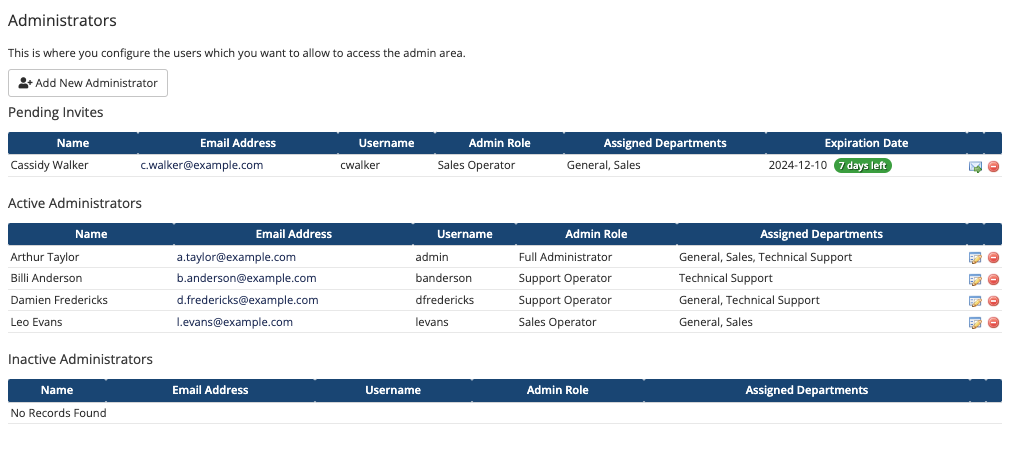
2. Click the Resend Invitation icon.
Find the desired new admin under Pending Invites and click the Resend Invitation icon (the envelope with a green arrow).
The system will automatically resend the invitation email.
- Invitation links expire after seven days.
- Resending an invitation link invalidates the previous link, even if it had not expired yet.
Last modified: 2026 August 4