Set the Temporary Update Path
When you update WHMCS, the temporary path allows the system to stage files. You cannot perform automatic updates unless you have specified a writeable temporary path.
Modifying the update configuration requires the Modify Update Configuration administrator role permission, which is separate from the Update WHMCS permission.
Configure a Temporary Path
To configure the temporary update path:
1. Create a temporary update directory.
Create a directory on your server using your preferred FTP client or file manager.
- Make sure that this directory is outside of the public document root (similar to the
attachments,downloads, andtemplates_cdirectories) and the PHP user can write to it. - We recommend using a descriptive directory name (for example,
update_temp).
2. Go to Update WHMCS.
Go to Utilities > Update WHMCS.
3. Click Configure Update Settings.
Click Configure Update Settings in the top-right corner of the page.
4. Enter the new directory’s path.
Enter the absolute path for the new directory in Temporary Path (for example, /var/www/html/update_temp):
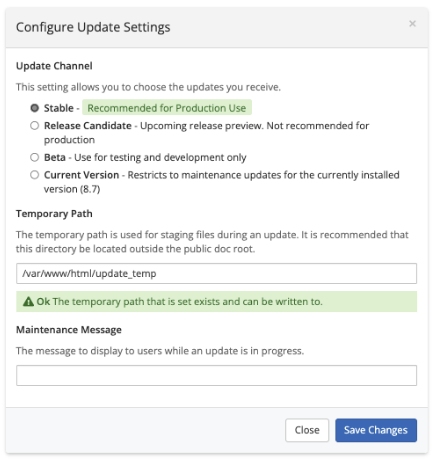
5. Save your changes.
Click Save Changes.
Last modified: 2026 August 4