Error Pages
The WHMCS application will suppress all non-critical warnings and notices and attempt to complete all requested actions in its default configuration. If an error condition is critical and the continued execution of a requested action is either detrimental or not possible, the system will display a friendly, styled error page and log the event.
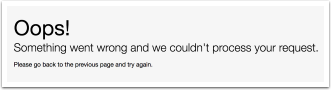
You can customize the appearance of these error pages. To control how WHMCS reports and manages errors (for example, to enable error display while debugging), see Errors in WHMCS.
If the system encounters an error condition before WHMCS has the opportunity to initialize, the system renders a rudimentary but HTML-friendly body. If this is not possible due to the timing of the error, the system will use the server environment settings.
Error Templates
The Twenty-One and Six system themes include default error templates. You can find them within each theme’s template directory (for example, /templates/twenty-one/) at the following filepaths:
error/internal-error.tplerror/page-not-found.tplerror/unknown-routepath.tpl
Custom Themes
If you create a custom theme, you can customize these pages by creating these files in your theme’s directory (for example, /templates/example/error/internal-error.tpl, where example is the directory for your custom theme).
You cannot change the dynamic content that WHMCS inserts into these files. However, your customized files can reposition that dynamic content, replace it with your own hardcoded alternative, or omit it entirely. To help reduce any further possible error paths, Smarty doesn’t process these files.
Error Template Variables
These files can use the following variables:
| Variable | Description |
|---|---|
css | Any CSS content. By default, this is in the HTML head tag. |
email | The configured default email address in the General tab at Configuration () > System Settings > General Settings. |
stacktrace | The PHP stack trace of the error condition. The system only populates this information if Display Errors is enabled via the configuration file or in the Other tab at Configuration () > System Settings > General Settings. |
systemurl | The configured System URL setting in the General tab at Configuration () > System Settings > General Settings. |
title | The document title. By default, this is in the title tag in the head tag, as well as within an h1 tag of the default body. |
Last modified: 2026 August 4