Update Failed Errors
Problem
This information only applies to self-hosted WHMCS installations. WHMCS Cloud updates WHMCS for you automatically.
An automatic update failed with the following error message:
Update Failed

An error occurred that prevented the update from completing successfully.
Cause
You can find the cause of the issue by examining the full output below the error message. Often, this is immediately following the [RuntimeException] label. For example:
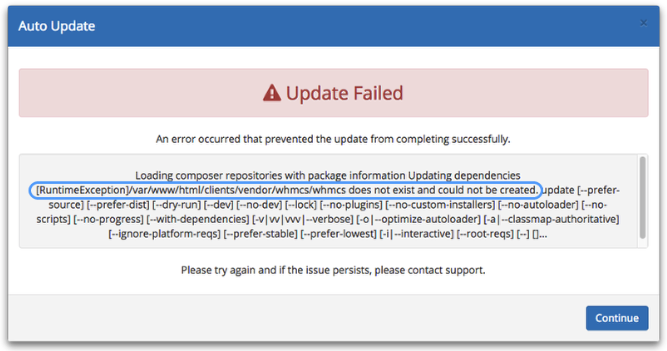
In the example above, the error indicates that a directory didn’t exist and the system could not create it. This is a permissions-related error.
The following issues are the most common causes of automatic update failures:
| Error Message | Description | Solution |
|---|---|---|
A database upgrade is already in progress. Try again in N minutes. If that upgrade stopped without finishing, its lock will expire by then. | Another process is applying database changes and has temporarily blocked updates. WHMCS stopped this update rather than apply the same changes alongside it. | Wait for the number of minutes in the message, then try the update again. The lock expires within 15 minutes if the existing process stops. |
A fatal error occurred while fetching the update. Please check to make sure your memory limits and execution time are set to the recommended values. | The update process timed out. | For steps to troubleshoot and resolve this issue, see Fatal Error Fetching Update. |
Another process took over the database upgrade lock, so this upgrade has stopped rather than apply the same changes alongside it. | Another process blocked upgrades while this update was applying database changes. The other process applies the remaining changes. | Check the Activity Log at Configuration () > System Logs for Another process took over the upgrade lock for this update and is applying the remaining changes. and confirm that the other process finished the update. |
Another request already completed or replaced this update. | A second request repeated a finish request for an update that already finished. | No action is necessary. WHMCS made no changes for the repeated request. |
Apply update dry-run detected x permission issues | Existing file permissions are incorrect. | For steps to troubleshoot and resolve this issue, see Update Dry Run Errors. |
cURL error 28: Operation timed out after 300000 milliseconds with xxxxxx out of yyyyy bytes received | Due to a network connectivity issue, the system could not download the required update files within the 300 second time limit. | For steps to troubleshoot and resolve this issue, see cURL Timeout Errors. |
Error: Apply update dry-run permission issues | This is a permissions issue that is preventing the Automatic Update feature from writing to, executing, or deleting files in the WHMCS directory. | Make certain that the user under which WHMCS runs has full permissions to the WHMCS installation’s directory. For more information, see Update Dry Run Errors. |
Error: chmod() has been disabled for security reasons | This indicates that the chmod() PHP function is disabled in your PHP configuration. | Enable the chmod() function in your PHP configuration.For help, contact your hosting provider or system administrator. |
Error: chmod(): Operation not permitted | This is a permissions issue that is preventing the Automatic Update feature from writing to, executing, or deleting files in the WHMCS directory. | Make certain that the user under which WHMCS runs has full permissions to the WHMCS installation’s directory. |
[ErrorException] file_put_contents(/path/to/file): failed to open steam: Permission Denied | This is a permissions issue that is preventing the Automatic Update feature from writing to, executing, or deleting files in the WHMCS directory. | Make certain that the user under which WHMCS runs has full permissions to the WHMCS installation’s directory. |
[ErrorException] mkdir(): Permission denied | This is a permissions issue that is preventing the Automatic Update feature from writing to, executing, or deleting files in the WHMCS directory. | Make certain that the user under which WHMCS runs has full permissions to the WHMCS installation’s directory. |
[ErrorException] ZipArchive::extractTo(/path/to/file.php): failed to open stream: Disk quota exceeded update | This error indicates that you exceeded the available disk space in your hosting account. | Increase your disk space allowance and try again. For help, contact your hosting provider or system administrator. |
failed to open stream: Permission denied | This is a permissions issue that is preventing the Automatic Update feature from writing to, executing, or deleting files in the WHMCS directory. | Make certain that the user under which WHMCS runs has full permissions to the WHMCS installation’s directory. |
[RuntimeException] /path/to/directory does not exist and could not be created | This error may occur due to insufficient free disk space or a permissions issue. | Make certain that the user under which WHMCS runs has full permissions to the WHMCS installation’s directory. Additionally, make sure that you have at least 250 MB of available disk space before attempting an update. |
[RuntimeException] Could not delete /path/to/file.php | This is a permissions issue that is preventing the Automatic Update feature from writing to, executing, or deleting files in the WHMCS directory. | Make certain that the user under which WHMCS runs has full permissions to the WHMCS installation’s directory. |
The system could not reach the database upgrade lock and made no changes. Try again. | The database connection failed, so WHMCS could not reach the upgrade lock. WHMCS refused the upgrade rather than run it unprotected. | Check that your database server is available, then try the update again. |
The temporary update path is not valid. Please specify a writable temporary update path to proceed with update. | The system cannot write to the configured temporary update path. | Go to Utilities > Update WHMCS and specify a valid absolute path for Temporary Update Path. For more information, see Set the Temporary Update Path. |
The update stopped before replacing any files because it could not record the start of file relocation at /path/to/file. Check that the WHMCS root directory is writable, then try again. | WHMCS could not write the .whmcs-relocating file, which it requires before it replaces any files. This is a permissions issue in the WHMCS root directory. | Make certain that the user under which WHMCS runs can write to the WHMCS installation’s directory, then try the update again. |
[WHMCS\Exception] Unable to copy /path/to/file.php to /path/to/file.php. | This is a permissions issue that is preventing the Automatic Update feature from writing to, executing, or deleting files in the WHMCS directory. | Make certain that the user under which WHMCS runs has full permissions to the WHMCS installation’s directory. |
[WHMCS\Exception] Failed to perform early file copy during WHMCS file relocation: init.php | This is a permissions issue that is preventing the Automatic Update feature from writing to, executing, or deleting files in the WHMCS directory. | Make certain that the user under which WHMCS runs has full permissions to the WHMCS installation’s directory. |
Last modified: 2026 October 20